Server restart
For administrators who can configure restart, run it manually, and read run history. The backend must be published and able to reach the game process; a scheduled job is registered only while the feature is enabled.
Purpose
Configure a restart that is announced and traceable, or request one during a maintenance window and confirm it with run history and audit records.
Before you begin
- Confirm that the account can update restart settings, trigger a restart, and read run history.
- Confirm the maintenance window, player notice, backup, and rollback plan first. A restart disconnects online players.
- Set an explicit
Cron expressionandTimeZoneId. A blank time zone falls back to the server local time zone; do not infer the schedule time zone from a browser display.
Cron: 0 6 * * *
TimeZoneId: Asia/Shanghai
Procedure
Settings
- Open Restart settings and decide whether to enable scheduled restarts. When disabled, no cron job is registered; the manual entry still depends on permission.
- Enter a
Cron expressionand an explicitTimeZoneIdsuch asUTCorAsia/Shanghai, then save and wait for the settings to reload. The saved pair is the authoritative schedule configuration. - Set the warning lead seconds, warning message, and optional multi-stage warnings. Messages can use
{minutes}; multi-stage messages can also use{seconds}. A non-empty multi-stage list replaces the single warning. - Choose
Save world before restart,Graceful, orForcefor the maintenance policy. Enter aCustom restart commandonly when the external launcher requires one; a custom command bypasses the built-in restart pipeline. - To avoid a blood-moon window, enable scheduled deferral and set the pre-dusk protection hours and delay minutes. Save, confirm the success notice, and reload the settings to make sure the values were retained.
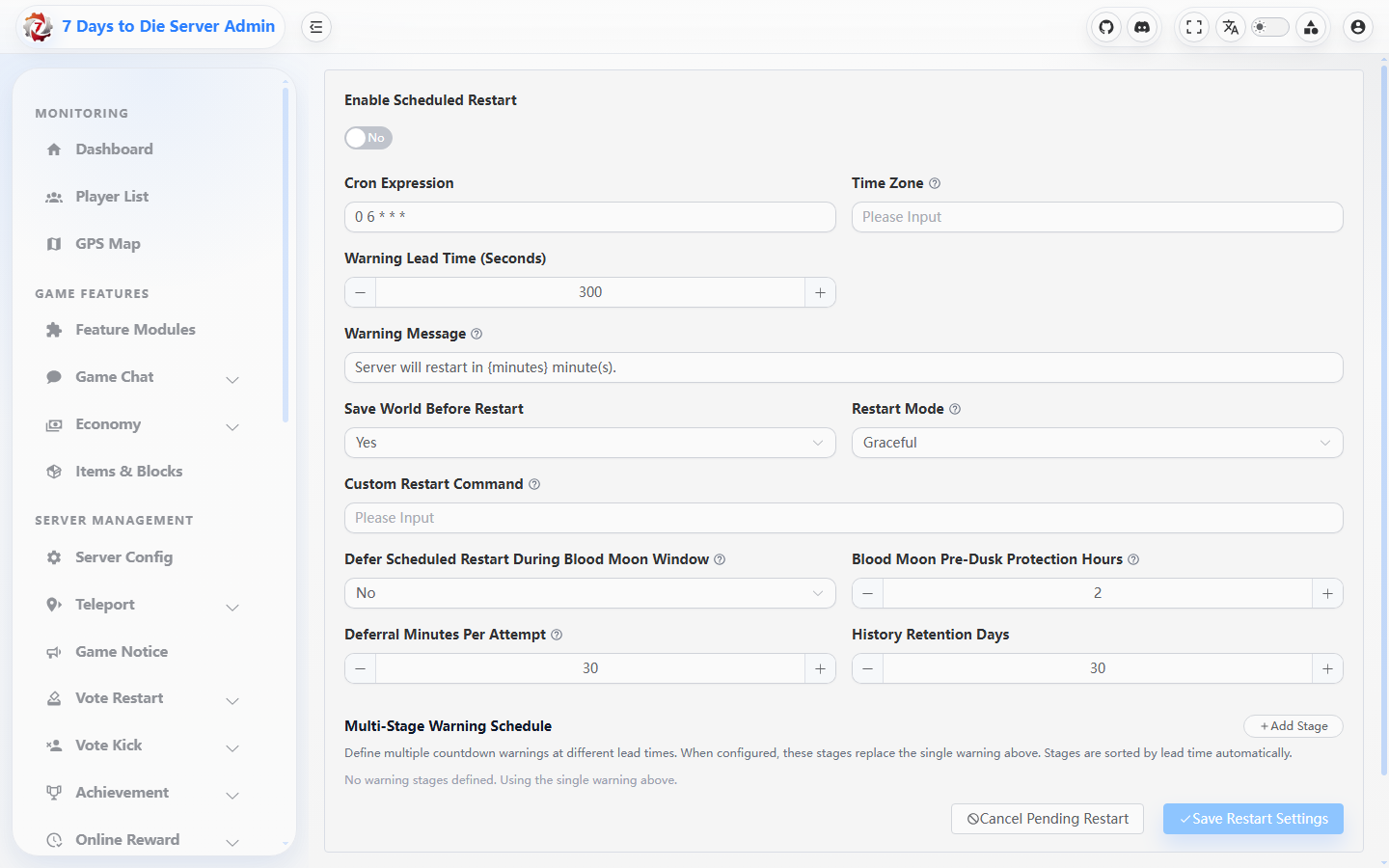
Figure: View restart scheduling and related settings controls; use the values currently saved in your environment.
Run now
- Open the manual restart page and enter an auditable reason. Override warning seconds or restart mode only for this run; leaving them blank uses the configured defaults.
- In the confirmation dialog, confirm the online-player disconnect, target server, and maintenance window again, then select Run now. Cancelling the confirmation creates no run.
- Read the returned status, summary, duration, and error message. During the countdown, Cancel pending restart is available from Settings; when no countdown exists it makes no change.
- Wait for the game process to exit and return as expected. “Request sent” is not proof that the server has recovered.
History
- Filter History by
TriggerSource(CronorManual), success, and time range to find the run. - Open its details and check
Status(Success,Failed, orSkipped),Summary,ErrorMessage, start/end time, duration, operator, and source IP. - Compare the row with audit records, game-process logs, and the reconnect result. A blood-moon deferral, duplicate request skip, or countdown cancellation should be explained by the status and details.
Verify the result
- After reload, enabled state, cron, time zone, and warning values match the saved values; a displayed
NextRunAtis only a time point calculated from the active job. - A manual run creates one
Manualhistory row whose summary/error matches the response; after the restart, the server accepts a connection and the game log has no startup error. - A scheduled run creates one
Cronrow. TreatNextRunAtas a display hint: the backend's savedCronExpressionplusTimeZoneId(or the server local time zone when blank) determines the trigger.
Limits and safety notes
WARNING
Restart depends on the backend cron process and game-process state. Graceful waits for an orderly shutdown, while Force can lose unwritten data; saveworld runs only when enabled and the game has started. A warning is a notice, not an execution lock.
DANGER
Run now, force restart, and custom restart commands mutate live state. Confirm the target, maintenance window, backup, and rollback owner before execution; never put a real host, path, player identifier, or token in an example.
- History retention automatically prunes old rows. Export audit evidence when longer retention is required instead of relying on the current table alone.