Access control
For administrators who manage player bans, whitelist entries, mutes, administrator accounts, and command permission rules. These changes affect live players and require the corresponding game-server permission.
Purpose
Apply the smallest access rule needed, test it with a dedicated account, and retain enough context to reverse the rule safely. Ban and whitelist entries affect player login/admission, mutes affect chat only, and permissions affect administrator and console-command authorization.
Before you begin
- Confirm the target player ID from a trusted player record. Use a sanitized placeholder such as
<PLAYER_ID>in tickets and screenshots. - Decide whether the action is a temporary restriction, permanent restriction, allow-list entry, mute, administrator grant, or command rule.
- Record the reason, operator, expiry, and approval before changing a live rule.
- Keep a second administrator available when changing the only administrator account or a command needed for recovery.
Procedure
Ban and whitelist
- Open Ban and Whitelist. The tabs are Ban, Whitelist, and Mute; use the tab that matches the intended scope.
- Search by player ID or display name. A Ban entry has player ID, display name, expiry time, and reason. A Whitelist entry has only player ID and display name. A Mute entry has player ID, display name, mute expiry, and mute reason.
- Save the entry and wait for the command result. When editing a Ban or Whitelist entry, the UI removes the old rule before writing the replacement. Mute editing uses the
AddOrUpdateMuteoperation, so it does not use that remove-then-create sequence. Verify the result before leaving the page. - Use the row action for a single removal or select rows for a confirmed batch removal. Re-check the selection immediately before confirming a destructive action.
- In the current authorizer, an active platform or cross-platform ban is checked before whitelist-only admission; a whitelist or administrator entry cannot bypass an active ban. Do not generalize this order to another server build or integration without testing: use a dedicated account with both rules in a controlled window and record the target server's actual login evaluation order.
Permissions
- Open Permissions and choose Admin User to grant a player an administrator permission level, or Command Permission to set the minimum level for a console command.
- For an administrator entry, enter a SteamID64 or an ID beginning with
Steam_orEOS_, a display name, and a permission level from0through2000. In the 7DTD permission model,0is the highest privilege and larger values are less privileged; choose the approved level and verify it with a test account. - For a command rule, enter the command name and required permission level. Keep the description in the change record even though the current form treats it as an operator note.
- Save, reload the table, and verify the effective rule with a dedicated test account. Do not test a new administrator level with the account that owns the only recovery path.
- To reverse a rule, remove the selected entry or replace it with the approved level, then confirm that a previously permitted or denied command now produces the expected result.
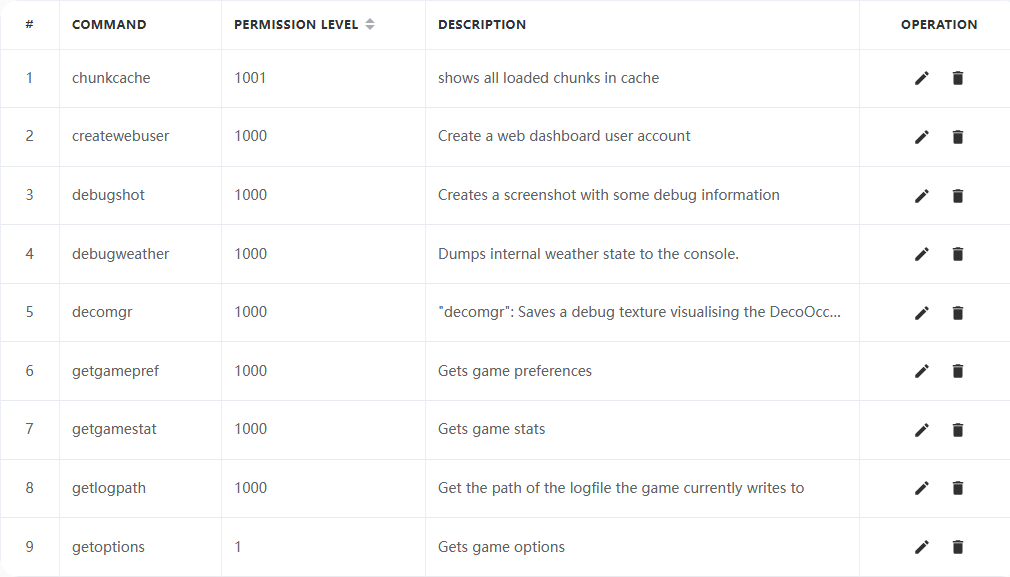
The command-permission table is shown without administrator accounts or ban-and-whitelist entries.
Verify the result
- A Whitelist row shows only the intended player ID and display name; Ban shows its expiry and reason; Mute shows its mute expiry and reason.
- A dedicated test account receives the expected login/admission result for Ban and Whitelist, and the expected chat result for Mute. Test both the positive case and the neighboring negative case, and record the observed Ban-versus-Whitelist order.
- The administrator or command permission table shows the expected level after refresh, and an authorized and unauthorized command test proves the rule affects command authorization. The action should appear in the audit log or game command history available for the server.
- Removing an entry permits the intended recovery path; do not infer success from a stale browser row.
Limits and safety notes
WARNING
Permission level ordering is a game-server policy, not a universal role name. For 7DTD, 0 is the highest privilege and larger values are less privileged. Confirm the effective level with a test account and avoid granting more access than the task requires.
DANGER
Ban, mute, batch removal, and administrator changes are live state changes. A wrong player ID can affect the wrong person, and removing the only admin can make recovery impossible. Require confirmation and retain the previous rule before editing.
- A whitelist or ban entry is not an identity-proofing system. Verify the player ID from the server's trusted record and protect exported lists as personal data.